
Applying for a Birth Certificate
Parents or the nearest family member can apply for a Birth Certificate in Tamil Nadu by following these steps:
Step 1: Visit the Town Panchayat or Apply online
The first step in registering a birth is by visiting the Town Panchayat or a Common Service Centre
(CSC) of the TN Government. For a birth certificate application in Chennai, visit the relevant Zonal Assistant Health Officer or the Birth and Death Registrar.
Step 2: Applying for the certificate
The applicant must bring the necessary documents when applying for the certificate. Normally it requires the identity and address proof of parents.
Step 3: Enter the details
Once the application form is received, the following details need to be entered.
- Name of the child
- Parents Name
- Gender of the child
- Date of Birth
- Place of Birth
Step 4: Submission of the form
After filling out the form, the applicant needs to submit it to the town panchayat or the relevant office, along with any additional documents if needed.
Required Documents
If the hospital informs the municipality about the birth, no additional documents are needed; otherwise, the head of the family or nearest relative should register the birth, which involves submitting a certificate from the delivering person or medical institution.
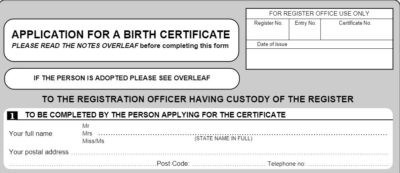
Tamilnadu Birth Certificate Application Form
Tamilnadu birth certificate application form is below for reference:
Step 1: Fill out the Birth Certificate Form
Step: 2

Step: 3

Step: 4

Step: 5

Step: 6

How to Download a Birth Certificate Online in Tamil Nadu (2026)
If your child’s birth has already been registered by the hospital or local registrar, you can download the certificate online using the official portals without visiting the office.
Step 1: Visit the Official Portal
- Go to TNREGINET or the CRSTN portal.
- These portals allow you to search and download registered birth certificates.
Step 2: Register or Login
- If you don’t have an account, click “User Registration” and complete your details (name, mobile number, email).
- If already registered, simply login with your credentials.
Step 3: Go to Birth Certificate Services
- After logging in, select “Birth Certificate Services” or “Search / Download Birth Certificate” from the dashboard.
Step 4: Enter Required Details
- Fill in information such as:
- Name of the child
- Date of birth
- Place of birth
- Parent’s details (as required)
Step 5: Submit and Search
- Click “Search” to find the registered birth record.
- If the birth is already registered, the system will display the certificate.
Step 6: Download the Certificate
- Click “Download” to save the birth certificate as a digitally signed PDF.
- You can now print or use it for official purposes such as school admission, passport application, or government services.
By following the correct registration process and using the official portals, you can ensure that the birth certificate is valid, accurate, and ready for all official purposes, such as school admission, passport applications, and government services.
