Published – September 29, 2026
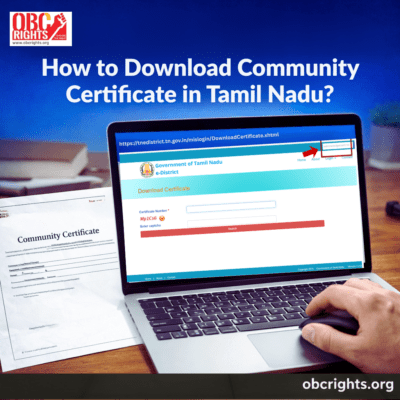
A community certificate is one of the most important documents issued by the government in Tamil Nadu. It confirms a person’s caste or community category and helps individuals claim reservation benefits in education, employment, and government welfare schemes. If you have already submitted an application and want to download community certificate, you can do it online through the Tamil Nadu e-Sevai portal.
If you have not applied yet, read our detailed guide on How to Apply for Community Certificate in Tamil Nadu to understand the application process, documents required, and eligibility.
This article explains the complete process of community certificate download, community certificate status check, and the community certificate Tamil Nadu validity.
Steps to Download Community Certificate(Tamil Nadu)
After the community certificate application is approved by the revenue authorities, applicants can download the certificate online through the official portal.
The certificate can be downloaded using the application number and registered mobile number.
Steps for Community Certificate Download
- Visit the official certificate download page of the Tamil Nadu eDistrict Portal.
- Enter your Certificate Number.
- Enter the CAPTCHA displayed on the screen.
- Submit the details.
- If the certificate is available, open the issued certificate.
- Download the certificate in PDF format and save it for future use.
The downloaded document is an official digital certificate issued by the Revenue Department of Tamil Nadu
Community Certificate Status Check
if you have applied recently, first check the status before going to the downloading the certificate. Applicants must check whether their application has been approved.
The community certificate status check allows applicants to track the progress of their application submitted through the e-Sevai portal or an e-Sevai center.
Steps for Community Certificate Status Check
- Visit the Tamil Nadu eDistrict Portal.
- On the page, locate the search bar provided for certificate services.
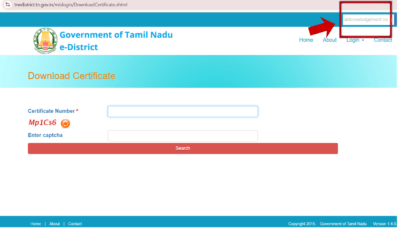
- In the search bar, type your Acknowledgement Number.
- Click the Search option to check the application status.
- View the current status.
- If the application status shows Approved, proceed with the verification process.
- Possible status results include:
- Application received
- Under verification
- Pending approval
- Approved
- Rejected
The certificate becomes available for download only after the status shows approved.
How to Download Community Certificate Without Acknowledgement Number
If you do not have the acknowledgement number, the community certificate cannot usually be downloaded directly from the online portal. However, there are a few ways to recover the certificate.
- Check Application Messages or Email
When the application is submitted, the acknowledgement number is often sent through SMS or email. Checking old messages may help you find the number. - Visit an e-Sevai Centre
You can visit a nearby e-Sevai centre and request assistance. The operator may be able to search the application using details such as your name, address, or Aadhaar number. - Contact the Taluk Office
If the certificate was issued earlier and the acknowledgement number is not available, you can contact the Taluk office or the Village Administrative Officer. After verifying your identity and community records, they can help retrieve the certificate details or guide you on getting a copy.
Community Certificate Application Processing Time
The time required for issuing the certificate depends on the verification process.
Typical processing stages include:
- Application submission
- Local verification by the Village Administrative Officer
- Final approval by the Tahsildar
In most cases, the certificate is issued within a few working days after successful verification.
Conclusion
The Tamil Nadu e-Sevai system allows citizens to access their certificates online without visiting government offices multiple times. After submitting the application, applicants can use the community certificate status check to monitor progress and complete the community certificate download once it is approved.
The e-community certificate serves as a valid digital document and the community certificate Tamil Nadu validity is generally lifelong, making it an essential record for education, employment, and government schemes.
FAQ
1. How can I download a community certificate in Tamil Nadu?
You can download the certificate from the TN eDistrict portal using your acknowledgement number, registered mobile number, and OTP verification.
2. How can I check community certificate status in Tamil Nadu?
You can check the application status on the TN eDistrict portal by entering your acknowledgement number in the search field.
3. What is the validity of a community certificate in Tamil Nadu?
Community certificates issued by the Revenue Department are generally valid for a lifetime.
For more such certificate related information visit: obcrights.org.