What is DigiLocker? DigiLocker is a Government of India digital document wallet that allows people to access, store and share important documents online. It is part of the Digital India programme, managed by the Ministry of Electronics and Information Technology (MeitY).
Instead of carrying physical certificates everywhere, you can access available digital records through the official DigiLocker website or mobile app.
For students, this can make it easier to retrieve marksheets, degree certificates and other academic records when needed.
How Does DigiLocker Work?
DigiLocker connects users with participating government departments, educational boards and other document-issuing organisations.
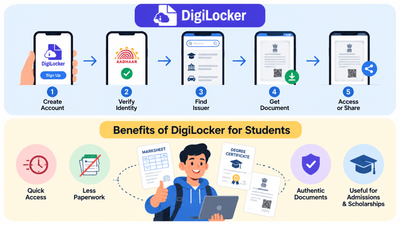
The process is simple:
Register → Verify Account → Find Issuer → Get Document → Access or Share
How to Use DigiLocker Step by Step?
- Visit DigiLocker: Open digilocker.gov.in or the official app.
- Create an account: Register using your mobile number and provide the requested details.
- Verify your account: Complete the required verification. An Aadhaar-verified account is needed to access verified issued documents.
- Find your document: Search for the relevant board, university or government department.
- Enter the details: Provide the roll number, registration number or other information requested by the issuer.
- Get your document: Select the available retrieval option. Successfully fetched documents appear under Issued Documents.
The document must be available through the issuing organisation for DigiLocker to retrieve it.
What Are the Benefits of DigiLocker?
| Benefit | How it helps |
| Easy access | View available documents online without searching through physical files. |
| Less paperwork | Share eligible digital records instead of repeatedly submitting photocopies. |
| Authentic documents | Access documents directly from participating issuers. |
| Convenient sharing | Share official records digitally when required. |
| Lower risk of loss | Retrieve available digital records even if a paper copy is misplaced. |
DigiLocker is especially useful when applying for education, jobs or government services that require document verification.
How Does DigiLocker Help Students?
Students often need their academic records for college admissions, higher studies and recruitment.
Through DigiLocker’s National Academic Depository (NAD), participating schools, boards and universities can make academic documents available digitally.
For example, a student who needs a Class 12 marksheet can:
- Sign in to DigiLocker.
- Search for the relevant education board.
- Select the available marksheet service.
- Enter the requested examination details.
- Retrieve the record if the board has published it.
Students can also use DigiLocker to access their academic records. If you need a step-by-step guide, read our article on how to download Class 10 and 12 marksheets from DigiLocker.
Students can use the same general process to find degree certificates or other academic awards made available by participating institutions.
Which Documents Are Available in DigiLocker?
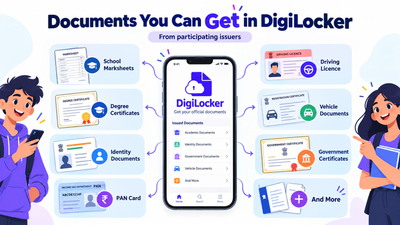
The available records depend on participating issuers.
| Category | Examples |
| Education | School marksheets, degree and diploma certificates |
| Identity and tax | Aadhaar-related records and PAN |
| Transport | Driving licence and vehicle registration certificate |
| Government services | Certificates and records published by participating departments |
Not every document from every government department or university is available. Check the issuer list before trying to retrieve a record.
If your marksheet or other documents are missing, check our guide on DigiLocker documents not showing and how to fix the issue for common reasons and solutions.
Are DigiLocker Documents Legally Valid?
Yes. Official documents issued through DigiLocker have legal recognition equivalent to physical originals under the applicable Information Technology rules.
However, there is an important difference:
- Issued Documents: Digital records provided by participating issuing authorities.
- DigiLocker Drive: Files uploaded by users themselves.
Uploading a scanned certificate does not make it an issuer-verified digital document.
For college admissions or recruitment, always check whether the institution requires a specific document format or verification method.
Frequently Asked Questions
1. Is DigiLocker Free to Use?
Yes. Accessing issued documents through DigiLocker is free. Optional premium services may have separate charges.
2. Is DigiLocker Safe?
DigiLocker uses security measures such as authentication, encryption and access controls. Use only the official website or app, and never share your login PIN or OTP.
3. What if My Marksheet Is Not Showing in DigiLocker?
First, check whether you selected the correct board or university and entered the required details correctly.
If the institution has not published the record, contact the issuing board or university. For platform-related issues, use the official DigiLocker Helpdesk.
Start Using DigiLocker for Important Documents
Understanding what DigiLocker is and how it works can help students manage academic documents with less paperwork.
Create your account, retrieve available records from official issuers and check the document requirements before submitting them for admission or recruitment.
Official References
Updated: 30 October 2026. Document availability and verification requirements depend on the issuing organisation and receiving institution.