
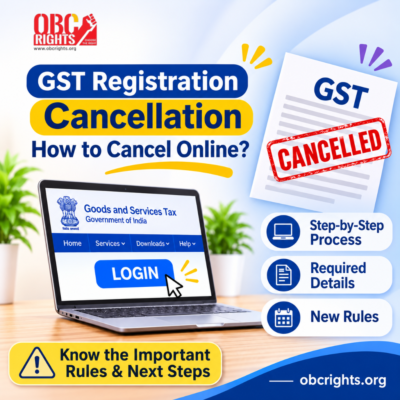
GST registration cancellation allows eligible taxpayers to close their GST registration when a business shuts down, is transferred or no longer requires registration.
You can apply through the official GST Portal using Form GST REG-16. However, cancellation does not automatically remove outstanding taxes or return-filing obligations.
How to Cancel GST Registration Online?
Follow these steps to submit your GST registration cancellation application through the official GST Portal.
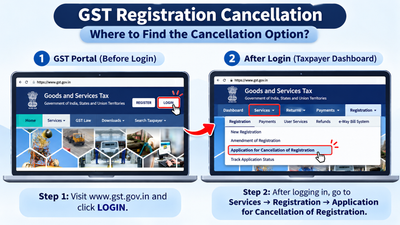
- Visit the official GST Portal.
- Click LOGIN in the top-right corner of the homepage.
- Enter your GST username, password and CAPTCHA to access your taxpayer dashboard.
- After logging in, select Services → Registration → Application for Cancellation of Registration.
- Under Basic Details, verify your information and enter your address for future correspondence.
- Open Cancellation Details, select the reason for cancellation and enter the proposed cancellation date.
- Provide closing-stock details, applicable tax liabilities and supporting information.
- Open the Verification tab and submit the application using DSC or EVC, as applicable.
- Save your Application Reference Number (ARN) to track the cancellation request.
Note: The cancellation option is available only to eligible taxpayers after logging in. It will not appear under Services → Registration on the public homepage.
For detailed screenshots and additional instructions, refer to the official GST Cancellation User Manual.
When Can You Cancel GST Registration?
Common reasons include:
- Permanent closure or discontinuation of business.
- Business transfer, merger or restructuring.
- No longer being legally required to register.
- Change in business constitution requiring a new PAN.
Taxpayers generally need to apply within 30 days of the event requiring cancellation, subject to applicable rules.
What Details Are Required for GST Cancellation?
| Requirement | Purpose |
| GSTIN and login credentials | Access your registration |
| Cancellation reason and date | Explain the request |
| Closing stock and liability details | Calculate applicable tax obligations |
| Required return information | Confirm filing compliance |
| Supporting documents | Support the cancellation reason, where required |
What Are the New GST Cancellation Rules for 2026?
From 1 December 2026, amended Rule 20 allows eligible GST cancellation requests to be processed electronically.
Taxpayers who have filed the prescribed returns and paid applicable tax, interest, fees and penalties can receive electronic cancellation confirmation through Form GST REG-38.
Applications with specified outstanding compliance requirements may be forwarded to a GST officer for examination.
Important: These changes take effect on 1 December 2026.
What Happens After GST Registration Cancellation?
After cancellation takes effect, you cannot continue collecting GST under the cancelled registration.
Earlier tax liabilities remain payable. Taxpayers required to file GSTR-10 (Final Return) must generally submit it within three months of the cancellation date or cancellation order, whichever is later.
For related information, read our GST Registration complete Guide.
How to Check GST Cancellation Application Status?
Visit Services → Registration → Track Application Status on the GST Portal and enter your ARN.
If the application remains pending, review any notices or outstanding compliance requirements.
Frequently Asked Questions
1. Can I Cancel GST Registration With Pending Returns?
Missing prescribed returns or unpaid liabilities may prevent electronic cancellation or require examination by a GST officer.
2. Is GST Registration Cancellation Free?
Yes. The official portal charges no cancellation application fee, but outstanding GST liabilities must still be settled.
3. What Is the Difference Between GST Cancellation and Revocation?
Cancellation ends a GST registration. Revocation restores an eligible registration cancelled by the tax officer through a separate procedure.
For assistance with government online services, contact the OBC Rights People Centre.