
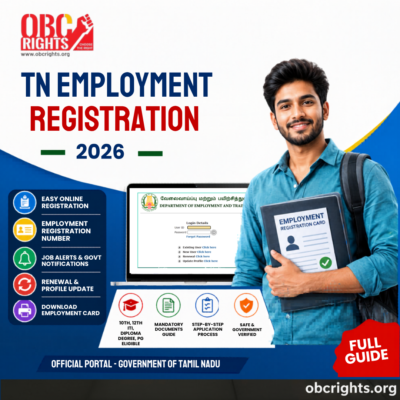
TN Employment Registration is an official online service provided by the Tamil Nadu Employment and Training Department for job seekers in the state. It allows candidates to register their educational qualifications in the government employment exchange database and receive an employment registration number for future job opportunities.
This registration is commonly required by students and job seekers applying for government employment exchange benefits, skill development programs, and job notifications in Tamil Nadu.
What is TN Employment Registration?
TN Employment Registration is a government-managed system where job seekers submit their personal and educational details to the Tamil Nadu Employment Exchange.
Once registered, candidates receive:
- Employment Registration Number
- Employment Card (Digital/Physical)
- Seniority in Employment Exchange records
- Access to government job notifications and schemes
This system helps the government maintain a structured database of eligible candidates across Tamil Nadu.
The service is managed by the:
Department of Employment and Training under the Government of Tamil Nadu.
Who Can Apply for TN Employment Registration?
Any eligible resident of Tamil Nadu who has completed formal education can apply for TN Employment Registration. This service is open to students and job seekers from various academic backgrounds.
Eligible Categories:
- SSLC (10th pass) candidates
- Higher Secondary (12th pass) students
- ITI certificate holders
- Diploma holders
- Undergraduate (UG) students
- Postgraduate (PG) students
- Engineering graduates
- Professional course candidates
- Job seekers preparing for government jobs
- Candidates seeking employment exchange registration benefits
Mandatory Documents (Based on Qualification)
For 10th / 12th Pass Students:
- Aadhaar Card
- SSLC Mark Sheet
- HSC Mark Sheet (if applicable)
- Transfer Certificate (if required)
- Community Certificate (if applicable)
- Nativity Certificate (if applicable)
- Passport-size photograph
- Active mobile number and email ID
For Diploma / ITI / Degree Holders:
- All above documents
- Diploma / ITI Certificate OR Degree Certificate
- Higher education mark sheets (if applicable)
How to Apply for TN Employment Registration Online?
The registration process is fully online through the official Tamil Nadu employment portal.
Step 1: Visit the Official Portal
Go to the Tamil Nadu Employment Exchange website: TN Employment Portal
and click “New user”.
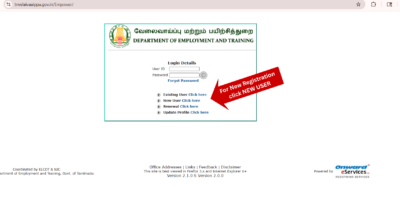
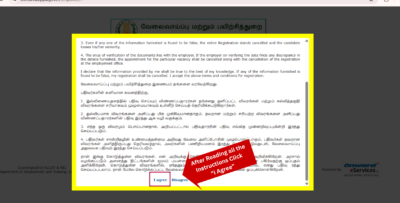
Step 2: Read Instructions and Accept Terms
Carefully read all instructions displayed on the screen.
- Read the guidelines properly
- Click “I Agree” to continue
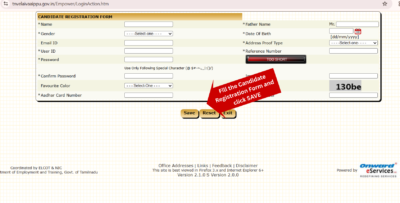
Step 3: Create Registration Account
Fill in basic candidate details [Candidate Registration Form]
- Name
- Date of Birth
- Aadhaar Number
- Mobile Number
- Email ID
- User ID (your choice)
- Password (your choice)
Then submit the form.
After submission, your account will be created.
Step 4: Login to the Portal
Go to the login page and enter:
- User ID
- Password
- Captcha code
Click login to access your dashboard.
Step 5: Fill Personal Details
After login, complete your profile by entering:
- Full address
- Community details
- Nativity details
- Contact information
- Disability details (if applicable)
Step 6: Add Educational Qualification Details
Enter academic information such as:
- SSLC (10th) details
- HSC (12th) details
- Degree / PG details (if applicable)
- Year of passing
- Institution name
- Certificate Number
- Marks and specialization
Ensure details exactly match your certificates.
Step 7: Add Technical and Skill Details
Update/add your skill profile, including:
- Computer knowledge
- Typing/shorthand skills
- Technical certifications
- IT / vocational skills
- Other job-related abilities
Step 8: Review All Details
Before final submission:
- Check personal details
- Verify educational information
- Correct any mistakes
This step is very important because chan after submission may be restricted.
Step 9: Final Submission and Download Employment Details
After completing all details and verification, click Submit to finish the registration process.
Once submitted successfully:
- Your Employment Registration Number will be generated
- Your profile will be activated in the Employment Exchange system
After this, candidates can:
- Download their employment registration details / card
- Print it for future reference
- Safely store their User ID and Password for future login and renewal
TN Employment Registration Renewal
TN Employment Registration must be renewed periodically to keep the profile active in the employment exchange system. Candidates should ensure renewal is done before the expiry date to maintain their registration validity and seniority status.
For the complete step-by-step renewal process, login instructions, and status check details, you can refer here: TN Employment Registration Renewal Full Guide (Step-by-Step)
How to Recover TN Employment Login Details?
If you forget login credentials:
Password Reset:
- Open login page
- Click “Forgot Password”
- Enter registered mobile number
- Verify OTP
- Set new password
Benefits of TN Employment Registration
TN Employment Registration provides multiple advantages:
- Government employment exchange record
- Priority in job notifications
- Seniority-based consideration
- Access to skill development programs
- Easy update of qualifications
- Centralized job seeker database
Common Issues and Solutions
These are common problems applicants often face, and how to avoid them.
1. Aadhaar Mismatch Problem
Ensure the name and date of birth match exactly with the Aadhaar records.
2. Login Error
Check password accuracy or reset using OTP.
3. Entering an Incorrect Certificate Number
All educational and identity certificate numbers must be entered correctly.
4. Registration Not Showing
Wait for verification or contact the employment office.
Is TN Employment Registration Mandatory?
It is not mandatory for private jobs, but it is highly useful for:
- Government job aspirants
- Employment exchange candidates
- Skill development applicants
- State job notification seekers
Frequently Asked Questions (FAQs)
1. Can I apply for TN Employment Registration online?
Yes, TN Employment Registration can be completed fully online through the official Tamil Nadu Employment Exchange portal.
2. How do I register for TN Employment Exchange in Tamil Nadu?
You can register by visiting the official portal, creating a new user account, and completing your personal and educational details.
3. Is TN Employment Registration available for 10th and 12th pass students?
Yes, students who have completed SSLC or HSC can apply for employment registration along with higher education candidates.
4. Do I need to visit the employment office for registration?
No, in most cases registration is done online. Physical visit is not required for initial application.
5. Can I update my qualification in TN Employment Registration?
Yes, candidates can update additional educational qualifications and skill details after logging into their account.
6. How can I download my TN Employment Registration card?
After login, you can download or print your employment registration details from the dashboard.
7. What happens after TN Employment Registration?
After successful registration, you will receive an employment registration number and your profile will be added to the employment exchange database.
Conclusion
TN Employment Registration is an important government service for job seekers in Tamil Nadu. It helps maintain official employment records, provides access to job notifications, and supports career opportunities through the employment exchange system.
Candidates should ensure accurate registration, keep login details safe, and renew their profile regularly to maintain active status in the system.