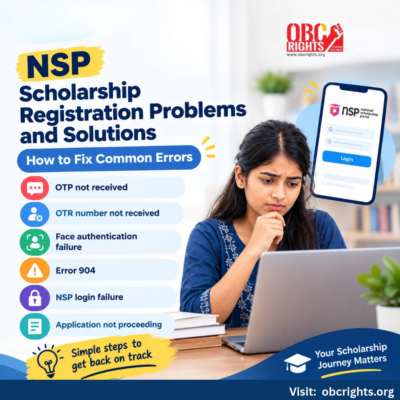
Facing problems while registering or applying for a scholarship on the National Scholarship Portal (NSP)? Issues such as OTP not received, OTR number missing, Aadhaar face authentication failure or login errors can prevent students from completing their applications.
Here are common NSP scholarship registration problems and solutions to help you identify the issue and take the next step.
Common NSP Registration Problems and Solutions
| Problem | What students can do |
| OTP not received | Check the registered mobile number, network and resend option |
| OTR number not received | Check whether face authentication is complete and use the OTR retrieval service |
| Face authentication failure | Check the required apps and Aadhaar biometric lock status |
| Error 904 | Update the UIDAI Aadhaar Face RD app |
| NSP login failure | Check credentials and use the official recovery options |
| Scholarship application not proceeding | Review missing details, eligibility and portal messages |
1. NSP OTP Not Received During Registration
If you do not receive an OTP while registering:
- Check whether you entered the correct mobile number.
- Confirm that your phone can receive SMS messages.
- Wait for the OTP and use Resend OTP if the option is available.
- Avoid repeatedly requesting OTPs within a short period.
If the problem continues, contact the official NSP helpdesk.
2. NSP OTR Number Not Received
Students receive a registration reference number before completing the face authentication process. The 14-digit OTR number is generated after successful face authentication.
If you have received only a reference number, complete the pending authentication through the NSP OTR app.
If you already completed the process but cannot find your OTR, use the Know Your OTR service available through NSP and follow its identity verification instructions.
Do not create another registration simply because you cannot find your existing OTR number.
3. NSP Face Authentication Not Working
Face authentication may fail if the required apps are unavailable, authentication cannot be completed or Aadhaar biometrics are locked.
Try these steps:
- Install or update the official NSP OTR app and Aadhaar Face RD app.
- Make sure your device camera is working.
- Follow the face authentication instructions shown in the app.
- Check whether Aadhaar biometric authentication is locked.
- NSP specifically advises students to ensure that Aadhaar biometrics are unlocked before attempting face authentication.
You can check the lock status through the UIDAI My Aadhaar portal or the mAadhaar app.
4. How to Fix NSP Face Authentication Error 904
If Error 904 appears during face authentication, NSP provides a specific solution:
- Open the Google Play Store.
- Search for the official UIDAI Aadhaar Face RD app.
- Update the app to the latest available version.
- Reopen the NSP OTR app and retry authentication.
- This solution is published in the official NSP student announcements.
If the error remains after updating, contact the NSP helpdesk rather than repeatedly changing your registration details.
5. NSP Login Problem: Unable to Access Your Account
If you cannot log in to the scholarship application portal:
- Check that you are using the official website, scholarships.gov.in.
- Make sure you are entering the correct OTR number and login credentials.
- Use the official password recovery option if you have forgotten your password.
- Check whether your OTR registration was completed successfully.
If the portal displays an unfamiliar error message, keep a record of the message and contact the helpdesk.
Never share your password or OTP with someone offering to fix your login.
6. NSP Scholarship Application Not Proceeding
Sometimes students can log in but cannot complete their scholarship application.
Check whether:
- Any mandatory field is incomplete.
- Your academic or institution details need correction.
- You meet the eligibility requirements of the selected scholarship.
- A required document has not been uploaded.
- The portal displays a specific validation or verification message.
Follow the instructions shown for that particular error. If the issue involves incorrect Aadhaar or academic records, contact the responsible issuing authority or institution instead of entering false information.
For the correct application sequence, read our How to Apply for NSP Scholarship Online: Step-by-Step Guide.
What If the NSP Problem Is Still Not Resolved?
Students can contact the official NSP helpdesk or register a grievance through the portal.
Official NSP Helpdesk
Phone: 0120-6619540
Email: helpdesk@nsp.gov.in
Support hours: 8:00 AM to 8:00 PM, except government holidays
Grievance service: Available under the Public section of NSP
When reporting an issue, mention the error message, the stage where it occurred and your application or reference details through the official support channel.
Do not include Aadhaar numbers, passwords, OTPs or banking credentials in public posts or chatbot messages.
Frequently Asked Questions
1. Can I create another OTR if my previous registration failed?
First check whether an OTR or reference number has already been generated. Use NSP’s recovery facilities or contact the helpdesk before attempting another registration.
2. Can I complete NSP registration without face authentication?
The official OTR process requires face authentication to generate the OTR number. Students unable to complete it should seek assistance through an authorised Common Service Centre or NSP support.
3. Can a Common Service Centre help with NSP registration problems?
Yes. NSP provides assisted registration and scholarship application services through authorised Common Service Centres.
The official portal lists a ₹30 total service charge for the complete assisted registration and application activity.
Find a centre through the official CSC locator.
Need Help With NSP Scholarship Registration?
If you are unsure about the application process, scholarship eligibility or supporting documents, OBC Rights People Centre can provide guidance.
Contact OBC Rights People Centre
- Erode and Sathyamangalam: +91 75988 00123
- Coimbatore: +91 99444 28101
- Gobichettipalayam: +91 86106 47453
Visit OBC Rights People Centre for scholarship-related guidance.
For unresolved portal errors, identity authentication issues or account access problems, use the official NSP helpdesk.
Official Sources
- National Scholarship Portal
- NSP Student Announcements
- NSP OTR Registration Guidelines
- NSP Student FAQs
Information checked on 16 October 2026. NSP interface options and technical instructions may change, so follow the latest instructions displayed on the official portal.