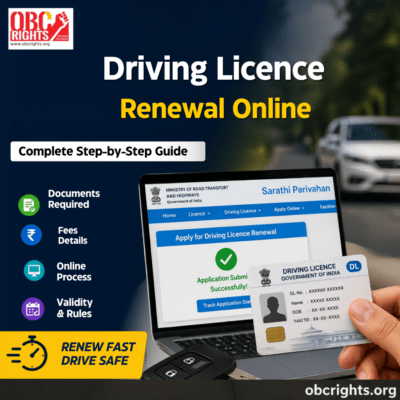
If your driving licence is about to expire or has already expired, you can start the renewal process online through the official Sarathi Parivahan portal. The process generally involves selecting your state, entering your existing licence details, uploading the required documents, paying the applicable fee and completing an RTO visit if one is required.
This guide explains the driving licence renewal process online, documents, fees, expiry rules, Form 1A and application status in a simple way.
Driving Licence Renewal Online
You can renew your driving licence through the official Sarathi Parivahan portal without visiting an RTO in most cases. Before starting, identify which situation applies to you because the forms and requirements can differ based on your age, licence type and whether your licence has expired.
What are the Documents Need for Driving Licence Renewal?
The forms and requirements mainly depend on your licence type and age. Find the situation that applies to you.
1. If You Have a Private Licence and Are Below 40
Keep your existing driving licence and required documents ready. For a non-transport/private licence renewal, Form 1 is the physical fitness self-declaration. You need to complete this form to confirm that you meet the required physical fitness conditions for driving. Keep your existing driving licence and the other documents required for the renewal application ready.
2. If You Have a Private Licence and Are 40 or Above
Along with your existing driving licence and required documents, you need Form 1A, which is a medical certificate issued after the required medical examination.
3. If You Have a Transport or Commercial Licence
For renewal of a transport-vehicle licence, Form 1A (medical certificate) is required. Keep your existing driving licence and other required documents ready.
Parivahan’s renewal guidance specifies:
- Form 1 for non-transport vehicles and
- Form 1A for transport vehicles and applicants aged 40 or above.
4. If Your Driving Licence Has Expired
First, check how long ago it expired.
- Expired within 1 year: You can apply for renewal under the applicable renewal procedure.
- Expired for more than 1 year: You must undergo and pass the prescribed test of competence to drive before the licence can be renewed, as provided under Section 15 of the Motor Vehicles Act.
Common Supporting Documents
Apart from the applicable form and your driving licence, you may need:
- Address proof
- Recent photograph
Any additional documents your specific application requires
Step-by-Step Process for Driving Licence Renewal Online
Step 1: Visit the Official Portal
Go to the Sarathi Parivahan website of the Ministry of Road Transport and Highways.
Step 2: Select DL Renewal Option
Select your state from the list provided.
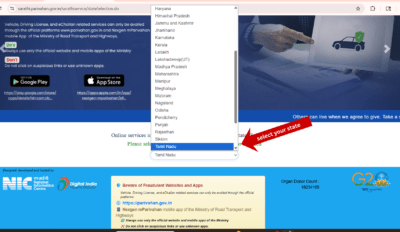
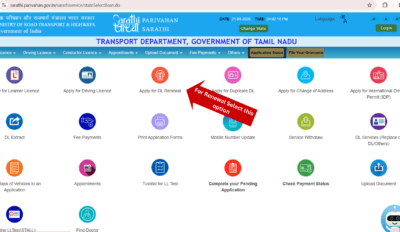
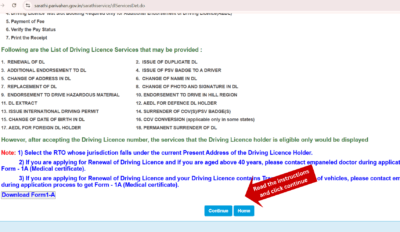
Select the Apply for Driving Licence Renewal and read the instructions fully, and click Continue.
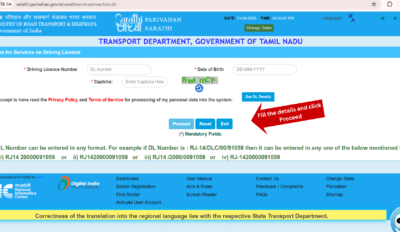
Step 3: Enter Details
Provide your driving licence number, date of birth, and registered mobile number for OTP verification.
Step 4: Upload Documents
Upload scanned copies of required documents such as your old licence, ID proof, and medical certificate if applicable.
Step 5: Pay Renewal Fee
Make an online payment through debit card, credit card, or net banking. The fee generally ranges between ₹200 to ₹500 depending on category and state rules.
Step 6: Book Appointment (if required)
Some applicants may need to visit the RTO for verification, photo capture, or biometric updates.
Step 7: Submit Application
Once the application is submitted, an application number will be generated for your reference. Save it for future tracking.
Step 8: Track Status Online
You can check the status of your renewal application using the Sarathi portal.
Driving Licence Renewal Fees in India
The driving licence renewal fee may vary slightly depending on the state and licence category.
Approximate DL Renewal Fees
| Service | Approximate Fee |
|---|---|
| Driving Licence Renewal Fee | ₹200 |
| Smart Card Fee | ₹200–₹300 |
| Delay Penalty | Extra charges may apply |
| Medical Certificate | Depends on doctor/hospital |
Applicants should check their respective state transport portal for exact fee details.
How Long Does Driving Licence Renewal Take?
The driving licence renewal process usually takes:
- Typically within 3 to 7 working days in standard cases, depending on verification and RTO processing speed,
- Longer if physical verification is required.
Processing time may vary depending on the state transport department.
Can You Use DigiLocker After DL Renewal?
Yes, once the licence is renewed, the updated driving licence can usually be accessed digitally through:
- DigiLocker
- mParivahan app
Digital DL copies are widely accepted for verification purposes.
Driving Licence Validity After Renewal
The validity period of a non-transport/private driving licence depends on the holder’s age when the licence is issued or renewed:
- Below 30 years: Valid until the holder reaches 40.
- 30 to below 50 years: Valid for 10 years.
- 50 to below 55 years: Valid until the holder reaches 60.
- 55 years or above: Valid for 5 years.
These rules apply to both newly issued and renewed driving licences. A transport-vehicle licence has a separate validity period under Section 14 of the Motor Vehicles Act.
Important: The 40-year threshold is also relevant to the medical-certificate requirement for renewal, while the licence-validity period is determined by the age brackets above.
Can You Renew an Expired Driving Licence?
Yes, expired driving licences can usually be renewed online if they are within the allowed grace period.
However, delays may result in:
- Late fees,
- Additional verification,
- Fresh application requirements in extreme cases.
Driving with an expired licence is considered a legal violation under traffic regulations.
Is RTO Visit Compulsory for DL Renewal?
No, an RTO visit is not compulsory in every case.
Many applicants can complete the process online. However, some cases require physical verification, especially:
- Senior citizens,
- Transport licence holders,
- Biometric update cases,
- Medical verification cases.
Driving Licence Renewal for Senior Citizens
Applicants above 40 years generally need to submit Form 1A medical certificate during renewal.
Senior citizens may also be required to undergo additional verification depending on state transport rules.
Can a Commercial Driving Licence Be Renewed Online?
Yes, commercial or transport driving licences can also be renewed online through the Sarathi portal.
However, additional medical verification and transport-related requirements may apply.
Common Mistakes to Avoid
- Entering an incorrect licence number
- Uploading unclear documents
- Ignoring the medical certificate requirement
- Missing RTO appointment if scheduled
Frequently Asked Questions (FAQ)
Yes, you can renew within the grace period. After a long delay, additional steps may be required.
Yes, Form 1A medical certificate is required for applicants above 40 years and commercial licence holders.
Yes, many applicants can complete the process online. However, some cases require physical verification.
Usually 3 to 7 working days, depending on verification.
Final Words
The driving licence renewal online system has significantly simplified the renewal process for citizens across India. By using the official Sarathi Parivahan portal, applicants can renew their driving licence quickly, upload documents digitally, track application status online, and avoid unnecessary delays.
To ensure smooth approval:
- apply before expiry,
- upload accurate documents,
- follow official instructions carefully,
- and complete verification requirements on time.
A valid driving licence is not only a legal requirement but also an essential document for safe and responsible driving.
If you have any doubts regarding the online renewal of your driving licence, contact the OBCRIGHTS people help desk. We will guide you,
CONTACT: +91 7598800123
MAIL ID: obcpeoplecentre@gmail.com