Published – September 30, 2026
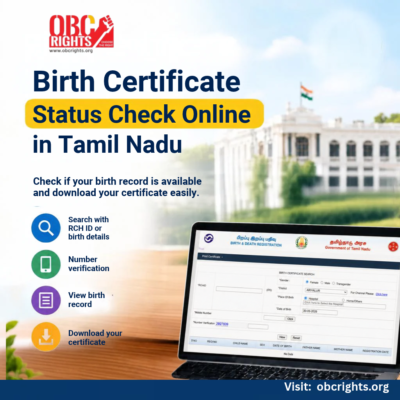
If a birth has already been registered in Tamil Nadu, you can check whether the birth record is available online through the Tamil Nadu Civil Registration System (CRS).
The online search allows you to find a registered birth using the RCH ID or birth details such as the date of birth, gender, district and place of birth. Mobile OTP verification is also required during the search.
This guide explains how to complete a birth certificate status check online in Tamil Nadu, what details you need, and what to do if the birth record is not found.
Quick Answer:
To check a birth certificate online in Tamil Nadu, visit the Tamil Nadu CRS website and select Certificate Download → Birth. Search using the RCH ID or the requested birth details, enter your mobile number, verify the OTP and click View. If the registered birth record is available online, it will appear in the search results.
If the birth has not yet been registered, read our detailed guide on How to Apply for a Birth Certificate in Tamil Nadu to understand the application process.
How to Check Birth Certificate Status Online in Tamil Nadu
If the birth has already been registered, follow these steps to check whether the record is available online.
Step 1: Visit the Tamil Nadu CRS Website
- Open the official Tamil Nadu Civil Registration System (CRS) website.
- On the homepage, find the Certificate Download option.
Step 2: Select Birth Certificate
- Click Certificate Download and select Birth.
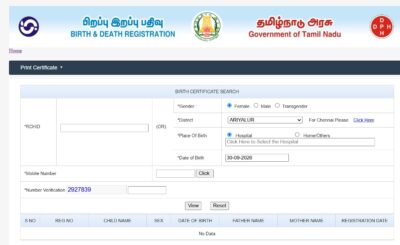
- The birth certificate search page will open.
Step 3: Choose the Search Method
- The portal allows you to search for the registered birth using the available details.
- If you have an RCH ID, enter it in the relevant field.
- If the RCH ID is not available, you can search using the birth details requested by the portal.
Step 4: Enter the Birth Details
Enter the required information carefully.
This may include:
- Gender
- District
- Place of Birth
- Date of Birth
Use the details given when the birth was originally registered.
Selecting the correct district and place of birth is particularly important because the record is linked to the place where the birth was registered.
Step 5: Enter Your Mobile Number
- Enter your mobile number in the field provided.
- A verification number will appear in the form. Enter that number in the required field. Once entered correctly, Number Verified will be displayed.
- Under Number Verification, enter the numbers shown on the screen in the given field.
Step 6: Click View
- After completing all the required details, click View.
- The system will search for birth records matching the information provided.
Step 7: Check the Birth Record
- If the birth has been registered and the record is available online, the matching birth details will appear.
- Check the information shown on the screen and identify the correct record.
- Finding the record online confirms that the birth registration is available in the system.
Step 8: Download the Birth Certificate
- Once you find the correct birth record, use the available option to download the certificate.
- You can save the certificate for future use or print a copy when required.
Birth Certificate Status Check for Chennai
If the birth was registered under the Greater Chennai Corporation, birth certificate services are also available through the Greater Chennai Corporation’s official website.
What Details Do You Need for a Birth Certificate Status Check?
Keeping the correct information ready will make the search easier.
| Details | Purpose |
| RCH ID | Can be used to search for the registered birth |
| Date of Birth | Helps identify the correct birth record |
| Gender | Used as part of the birth-record search |
| District | Identifies the district where the birth was registered |
| Place of Birth | Helps locate the correct registration record |
| Mobile Number | Used for OTP verification |
If you have the RCH ID, the search process may require fewer birth details.
Birth Certificate Status Not Found Online: What Should You Do?
First, recheck the RCH ID and birth details and make sure you selected the correct place of registration.
If the record still does not appear, contact the Birth and Death Registrar for the area where the birth was registered.
Note: Tamil Nadu’s common Civil Registration System has been used for birth and death registrations across the state from 2018. If you are searching for an older birth record and it is not available online, contact the concerned Corporation, Municipality, Town Panchayat, Village Panchayat or other local registration authority.
What Should You Do After Finding the Birth Record?
Once the correct record appears, check all the information carefully.
If everything is correct, proceed with the available certificate download option.
Save a digital copy of the birth certificate so that it can be accessed easily when required for purposes such as school admission, identity documentation or other official procedures.
Frequently Asked Questions
1. Can I Check Birth Certificate Status Without an Application Number?
Yes. You can search using the RCH ID or required birth details such as date of birth, gender, district and place of birth.
2. Can I check a birth certificate using only a mobile number?
No. The mobile number is mainly used for OTP verification. You still need to provide the RCH ID or the required birth information to search for the registered record.
3. What should I do if my birth record is available but contains an error?
Contact the Birth and Death Registrar responsible for the registration. Corrections to an existing birth record are handled separately and may require supporting documents.
4. Can I download the certificate once the birth record appears?
Yes. If the correct registered birth record appears and the portal provides the download option, you can select the record and download the birth certificate.
Note: Government websites, menu names and online procedures can change over time. Always use the official Tamil Nadu Government or concerned local-body website when checking or downloading a birth certificate.