Need your degree certificate for a government job, higher studies or document verification? DigiLocker degree certificate download allows graduates to access digital degree certificates issued by participating universities.
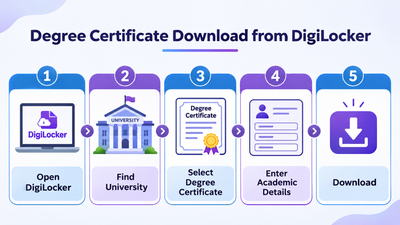
To download yours, sign in to DigiLocker, find your university under Education, select Degree Certificate and enter the required details. Your university must have published the record for it to be available.
How to Download Degree Certificate from DigiLocker
Follow these steps if your university has made its degree records available through DigiLocker.
Step 1: Open DigiLocker
Visit the official DigiLocker website or open the mobile app and sign in.
Step 2: Find Your University
Go to Browse Documents → Education and search for the university that issued your degree.
Step 3: Select Degree Certificate
Choose the available Degree Certificate service. Document names may vary between institutions.
Step 4: Enter Your Academic Details
Provide the information requested, which may include your:
- Registration or roll number
- Year of passing
- Name or other university record details
Step 5: Get Your Certificate
Check your entries, provide the requested consent and select Get Document.
Step 6: Download the Degree Certificate
Once retrieved, open Issued Documents and use the available download option to save your certificate.
These steps follow the National Academic Depository’s official student instructions.
How to Check Whether Your University Degree Is Available?
Not every university has published degree certificates for every graduation year.
DigiLocker’s National Academic Depository (NAD) provides an official record-availability list showing participating institutions, document types and available years.
Before trying repeatedly, visit the NAD Academic Records Availability page.
Check your university, select the degree-certificate record type and look for your passing year.
Important: A university appearing in DigiLocker does not mean all its degree records are available.
What If Your Degree Certificate Is Not Showing?
If your university degree certificate is not available in DigiLocker, check the reason before raising a complaint.
| Problem | What you should do |
| University not listed | Check NAD’s records list and contact the university about publication. |
| Passing year unavailable | Ask whether records for your graduation year have been uploaded. |
| No record found | Recheck your registration number and other requested details. |
| Incorrect name or details | Contact the university for correction of its academic records. |
| Retrieval error | Use the official DigiLocker Helpdesk after confirming your details with the university. |
Who should you contact first? If your academic record has not been published or contains incorrect information, contact the university’s examination or certificate section. For a technical retrieval problem, use DigiLocker Support.
For other retrieval problems, read our guide on DigiLocker documents not showing.
Is a DigiLocker Degree Certificate Legally Valid?
Yes. Degree certificates issued through DigiLocker NAD are legally recognised at par with physical originals under the applicable Digital Locker Rules.
The University Grants Commission (UGC) has also instructed higher education institutions to accept valid academic records available through DigiLocker NAD.
However, always follow the document-submission and verification requirements of the institution or recruiting organisation.
An officially issued degree certificate is different from a scanned certificate that you upload manually.
Read the UGC’s official acceptance circular.
Frequently Asked Questions
1. Can I Download My Old Degree Certificate from DigiLocker?
Yes, if your university has published records for your graduation year. Check the official NAD records list to confirm availability.
2. Is DigiLocker Degree Certificate Download Free?
Yes. Students can access available digital academic records through DigiLocker NAD without a download fee.
3. Can I Upload My Degree Certificate Myself?
You can store a personal copy in DigiLocker Drive, but it will not become an officially issued NAD degree certificate. The university must publish the academic record.
Need Help Getting Your Degree Certificate?
If your DigiLocker degree certificate download is unsuccessful, check your university’s record availability and academic details first.
For additional guidance on educational documents and digital services, visit OBC Rights People Point.
Official References
- National Academic Depository – Student Guide
- NAD – Academic Records Availability
- NAD – Frequently Asked Questions
- UGC – Acceptance of DigiLocker Academic Records
Updated: 5 November 2026. University participation, available graduation years and retrieval requirements may vary.