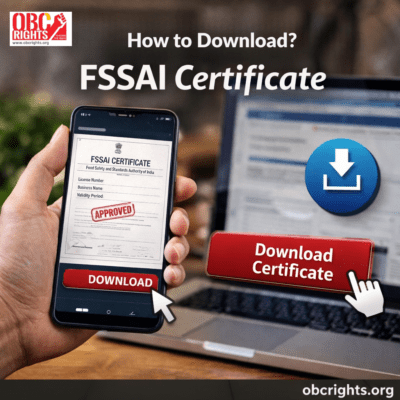
Once your FSSAI license or registration is approved, you can access your certificate online through the official FoSCoS portal. The certificate contains important details about your food business and its approval.
If you are looking for how to download an FSSAI certificate online, this guide explains the process, how to check your application status and what to do if you cannot access your certificate.
How to Download FSSAI Certificate Online?
You can access your approved FSSAI license or registration certificate through the official FoSCoS portal. The exact steps may vary depending on your application and the options available in your account.
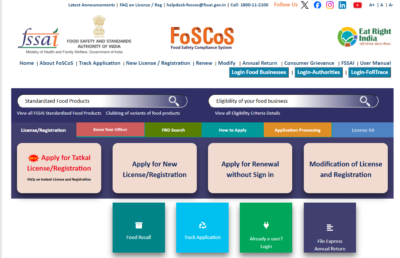
Follow these steps:
Step 1: Visit the FoSCoS Portal
Open the official FoSCoS website and navigate to the relevant login or certificate access option.
Step 2: Enter Your Login Details
Use the required credentials or license or registration details, depending on the access option provided by the portal. If you are using the login facility, enter your registered details to continue.
Step 3: Find Your Approved License or Registration
After accessing the relevant section, look for your approved FSSAI license or registration. Make sure you select the correct application associated with your food business.
Step 4: Download Your Certificate
Choose the available option to view or download your approved certificate. Save the document in PDF format if the portal provides that option.
After downloading, open the file and check that your business details and license information are correct. If the certificate is not available, check your application status or contact FoSCoS support.
If you have not applied for FSSAI registration or a licence yet, read our guide on FSSAI Registration Process Online to learn about the application process, required documents, fees and status tracking.
How to Check FSSAI Application Status?
If your FSSAI certificate is not available for download, check whether your application has been approved.
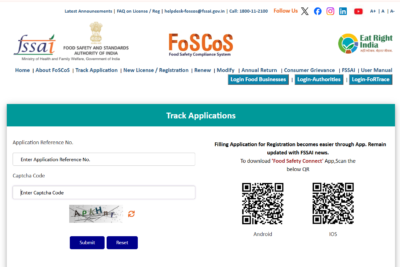
Follow these steps:
- Visit the official FoSCoS portal.
- Select Track Application Status.
- Enter your application reference number.
- Complete the displayed verification and submit the details.
- Check the latest status of your application.
If the application is still under review, you may need to wait for the licensing authority to complete the process. Once approved, follow the applicable certificate access procedure.
Details to Check on Your FSSAI Certificate
After downloading your certificate, verify the important information to ensure that it matches your approved application.
Common details include:
- FSSAI license or registration number
- Name of the food business operator
- Registered business address
- Type of license or registration
- Approved validity period
- Licensing authority details
If you notice any incorrect information, check the applicable modification process through FoSCoS.
Common Issues While Downloading FSSAI Certificate
Some users may face difficulties when accessing their FSSAI certificates online. Here are a few common issues and what you can do.
- Certificate not available: Check whether your application has been approved and whether you are accessing the correct account or service.
- Forgotten login details: Use the available account recovery options on the FoSCoS portal.
- Application still pending: Track your application status and wait for the approval process to be completed.
- Portal not responding: Try accessing the website again later or use another browser if the problem continues.
If the issue remains unresolved, refer to the official FoSCoS helpdesk for assistance.
FSSAI Certificate Validity and Renewal
FSSAI licenses and registrations are issued for a specified validity period, depending on the approval and applicable requirements. Check the expiry date mentioned on your certificate to know when it needs to be renewed.
Food business operators should apply for renewal within the prescribed timeframe to avoid disruption to their license or registration.
For detailed instructions, documents and application steps, read our guide on FSSAI License Renewal Online.
Frequently Asked Questions
1. Can I download my FSSAI certificate online?
Yes. Once your FSSAI license or registration is approved, you can access the certificate through the relevant facility on the official FoSCoS portal.
2. Can I download an FSSAI certificate before approval?
No. The final approved certificate becomes available after the licensing authority grants the application.
3. What should I do if my FSSAI certificate is not available?
Check your application status and confirm that you are using the correct login or certificate access option. If the problem continues, contact the official helpdesk.
4. Can I download my FSSAI certificate again?
If your approved certificate is available through the portal, you can access it again using the applicable service and save another copy.
Conclusion
Downloading an FSSAI certificate online allows food business operators to access their approved license or registration without relying on a physical copy from the issuing authority. Check your application status, retrieve the approved certificate through FoSCoS and verify the details after downloading.
For more such certificates, visit: obcrights.org.