Published – September 21, 2026
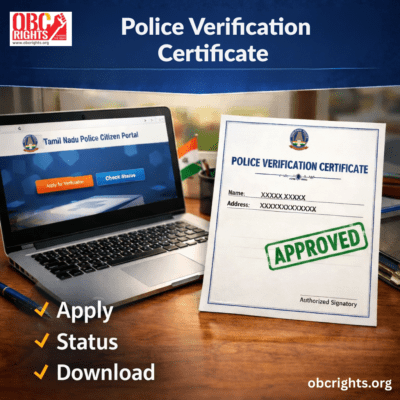
When applying for a job, renting a house, hiring domestic staff, or joining a private organization, you may be asked to submit a Police Verification Certificate (PVC). This document confirms that you do not have a criminal background based on police records.
This complete guide covers everything like how to get it, status check, and download online in Tamil Nadu.
Police Verification Certificate Tamil Nadu 2026: Key Details at a Glance
| Particular | Details |
|---|---|
| Certificate Name | Police Verification Certificate (PVC) |
| Issuing Authority | Tamil Nadu Police Department |
| State | Tamil Nadu |
| Application Mode | Online and Offline |
| Who Can Apply? | Tamil Nadu residents requiring background verification |
| Main Purpose | Employment, Tenant Verification, Domestic Help Verification, Contract Work, and Personal Verification |
| Online Application | Available through the Tamil Nadu Police Citizen Portal |
| Documents Required | Aadhaar Card, Address Proof, Photograph, and Supporting Documents (if applicable) |
| Application Fee | ₹500 for individual applications and ₹1,000 for private companies/institutions. |
| Verification Process | Document Verification and Local Police Field Verification |
| Processing Time | Generally 7 to 21 days |
What is a Police Verification Certificate?
A Police Verification Certificate (PVC) is an official document issued by the local police department confirming:
- Your identity
- Your residential address
- and your criminal record status (if any)
It is commonly required for employment, tenant verification, contract work, security services, and private background checks.
In Tamil Nadu, this certificate is issued by the Tamil Nadu Police after verification.
Who Needs a Police Verification Certificate?
You may need this certificate for:
- Private company jobs
- Government contract roles
- Security guard positions
- School/college employment
- Tenant verification
- Domestic help verification
- NGO or trust work
- Court submission
It is different from a Police Clearance Certificate (PCC), which is mainly used for passport and visa purposes.
Complete Process to Apply for Police Verification Certificate in Tamil Nadu
There are two methods: Online and Offline.
Method 1: TN Police Verification Certificate Online
Tamil Nadu residents can apply through the official portal of Tamil Nadu Police.
Step-by-Step Process
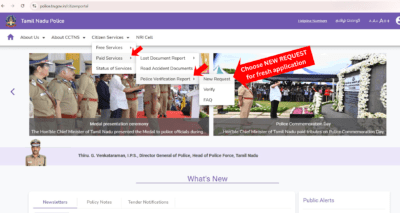
Step 1: Visit the Tamil Nadu Police Citizen Portal
Go to the official portal of the Tamil Nadu Police.
Select:
Citizen Services ⟶ Paid Services ⟶ Police Verification Report ⟶ New Request
Step 2: Click “Register” for New User

Click the Register button to create a new account.
Step 3: Enter the following personal details:
- Full Name
- Father’s / Husband’s Name
- Date of Birth
- Gender
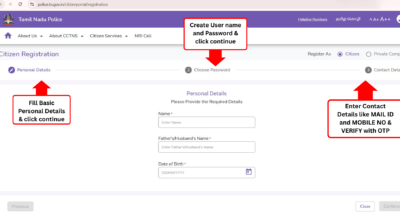
Step 4: Create Username and Password
Create a username and password for your portal account.
Step 5: Verify Mobile Number and Email
Enter your mobile number and email ID, then verify them using OTP authentication.
Step 6: Login to the Portal
After successful verification, log in using your username and password.
Step 7: Update Profile Details
Update your profile information if required.
Step 8: Enter Personal Details
Fill in the complete personal details required for verification.
Step 9: Enter Address Details
Enter both:
- Permanent Address
- Current Residential Address
Step 10: Select Service Type
Choose the appropriate verification type:
- Self Verification
- Tenant Verification
- Domestic Help Verification
Note:
Choose the service type based on your requirement:
- Self Verification – For your own background check (jobs or employment)
- Tenant Verification – For verifying a tenant renting your property
- Domestic Help Verification – For checking the background of household workers such as maids, drivers, or caretakers
Step 11: Upload Required Documents
Upload the required documents and address proof.
Step 12: Review and Submit
Carefully review all details before submitting the application.
Step 13: Pay the Application Fee
Complete the payment of the prescribed application fee using the available online payment options provided on the portal.
After Submission
Once the application is submitted successfully, the system will generate a unique acknowledgment number for your reference.
Make sure to note or save this number, as it will be required later to track your application status and download the Police Verification Certificate.
Method 2: Apply Offline at Police Station
If you prefer offline application:
- Visit your jurisdiction police station
- Ask for the Police Verification application form
- Fill in the details carefully
- Attach required documents
- Pay the fee (cash receipt provided)
- Wait for field verification
- Collect the certificate after approval
Documents Required for Police Verification Certificate
Keep these documents ready:
- Aadhaar Card
- Voter ID / Passport (if available)
- Address proof
- Passport-size photographs
- Employment letter (if required)
- Application form
Make sure your address matches across documents.
How to Check Status Online
After applying online, you can track your application.
- Visit the TN Police Citizen Portal
- Click on “Track Application”
- Enter acknowledgment number
- Enter registered mobile number
- View status
Status may show:
- Under Process
- Field Verification Pending
- Approved
- Rejected
If applied offline, you must contact your local police station.
How to Download Police Verification Certificate
If your application is approved:
- Login to the police portal
- Go to “Approved Applications”
- Click “Download Certificate”
- Save the PDF copy
- Print for submission
For offline applicants, the certificate must be collected from the police station.
Time Required to Receive a Police Verification Certificate?
Processing time depends on:
- Address verification
- Police workload
- Accuracy of documents
Average Timeline in Tamil Nadu:
- Application submission: Same day
- Field verification: 3–10 days
- Final approval: 7–21 days
In most cases, applicants receive the certificate within 10–15 working days.
Police Verification Certificate Fees
- Fees vary slightly depending on service type.
- Approximate range: ₹100 to ₹500
- Online applicants can pay through digital payment methods.
Police Verification Certificate Renewal
There is no permanent validity.
Usually valid for:
- 3 months
- 6 months (depending on employer requirement)
If your certificate expires:
- You must apply again as a fresh application
- There is no automatic renewal system
If you changed your address, you must provide updated proof.
Common Reasons for Rejection
Applications may be rejected due to:
- Address mismatch
- Incorrect details
- Incomplete documents
- Pending criminal case
- Failed field verification
Always double-check your information before submission.
Frequently Asked Questions
Q1. Is police verification mandatory for private jobs?
Not always. It depends on company policy.
Q2. Can I apply from another district?
You must apply under the police jurisdiction of your current or permanent address.
Q3. Can I download certificate multiple times?
Yes, if applied online and approved.
Q4. Is physical police visit compulsory?
In many cases, yes. Field verification is common.
Q5. How many days does police verification take in Tamil Nadu?
Police verification usually takes 7 to 21 days, depending on field verification and document accuracy.
Q6. What is the fee for Police Verification Certificate in Tamil Nadu?
The Police Verification service fee is ₹500 for individual applications and ₹1,000 for private companies or institutions.
Q7. Can I apply for Police Verification Certificate online in Tamil Nadu?
Yes, you can apply online through the official portal of the Tamil Nadu Police.
Q8. What is the difference between PVC and PCC?
PVC is used for local verification (jobs, tenants), while PCC is mainly required for passport, visa, and foreign travel purposes.
Q9. What happens if police verification fails?
If verification fails, your application may be rejected due to incorrect details, address mismatch, or pending cases. You must reapply with correct information.
Q10. Is Aadhaar mandatory for police verification?
Aadhaar is commonly required as identity and address proof, but alternative documents may be accepted.
Q11. Can tenant verification be done online in Tamil Nadu?
Yes, tenant verification can be done online by selecting the Tenant Verification option on the police portal.
Q12. How to check PVC status in Tamil Nadu?
You can check status online using your acknowledgment number and registered mobile number on the portal.
Final Words
Getting a Police Verification Certificate in Tamil Nadu is now simple with the online application facility provided by Tamil Nadu Police. Whether you are applying for a job, tenant verification, or contract work, following the correct steps ensures quick approval.
Apply carefully, track your status regularly, and download the certificate once approved.
For more such certificates required in daily life, visit: obcrights.org.
Read our guide on Police Clearance Certificate when applying for work visa and other.